Extrude
This example provides information on creating solids, faces and wires, and how to extrude a face along a wire.
If you go to the Modeling browser under the Modeling tab, you can see all the bodies the part contains.
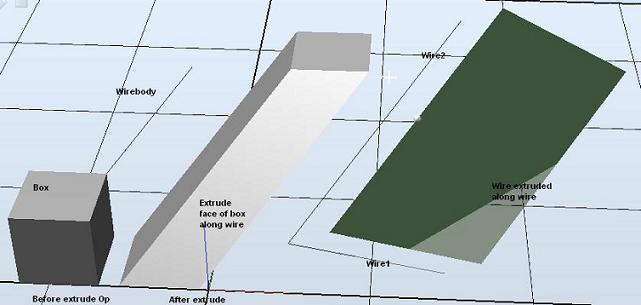
Solution
Create a Part object to contain the bodies and add it to the station.
Part p = new Part();
p.Name = "My_Extruded_Bodies";
station.GraphicComponents.Add(p);
Create a solid box and add it to My_Extruded_Bodies.
Body b = Body.CreateSolidBox(new Matrix4
         (new Vector3(0.0, 0.0, 0.0)), new Vector3(0.5, 0.5, 0.5));
b.Name = "Box";
p.Bodies.Add(b);
Create a face.
Face f = b.Shells[0].Faces[0];Create a wire.
Body wirebody = Body.CreateLine
                (new Vector3(0.0, 0.0, 0.0), new Vector3(1.0, 1.0, 1.0));
wirebody.Name = "Wirebody";
p.Bodies.Add(wirebody);
Wire w = wirebody.Shells[0].Wires[0];
Set the sweep option to solid.
SweepOptions so = new SweepOptions();
so.MakeSolid = true;
Create a Vector3 object to specify direction and length of the projection.
Vector3 vec = new Vector3(1.0, 1.0, 1.0);Extrude face along wire.
Body[] bds = Body.Extrude(f, vec, w, so);
foreach (Body bd in bds)
{
    bd.Name = "Face extruded along wire";
    p.Bodies.Add(bd);
}
Create a second wire.
Body wirebody2 = Body.CreateLine
                 (new Vector3(0.0, 0.0, 0.0), new Vector3(1.0, 1.0, -1.0));
wirebody2.Name = "Wirebody 2";
p.Bodies.Add(wirebody2);
Wire w2 = wirebody2.Shells[0].Wires[0];
Extrude the first wire along with the second.
Body[] bds2 = Body.Extrude(w, vec, w2, so);
foreach (Body bd in bds2)
{
    bd.Name = "Wire extruded along wire";
    p.Bodies.Add(bd);
}
Example
This example provides information on creating solids, faces and wires, and how to extrude a face along a wire.
Project.UndoContext.BeginUndoStep("BodyExtrude");
try
{
    Station station = Station.ActiveStation;

    // Create a part.
    Part p = new Part();
    p.Name = "My_Extruded_Bodies";
    station.GraphicComponents.Add(p);

    // Create a solid box and add it to My_Part1.
    Body b = Body.CreateSolidBox(new Matrix4
             (new Vector3(0.0, 0.0, 0.0)), new Vector3(0.5, 0.5, 0.5));
    b.Name = "Box";
    p.Bodies.Add(b);

    // Create face.
    Face f = b.Shells[0].Faces[0];

    // Create a wire.
    Body wirebody = Body.CreateLine
                    (new Vector3(0.0, 0.0, 0.0), new Vector3(1.0, 1.0, 1.0));
    wirebody.Name = "Wirebody";
    p.Bodies.Add(wirebody);
    Wire w = wirebody.Shells[0].Wires[0];

    // Set the sweep option to solid.
    SweepOptions so = new SweepOptions();
    so.MakeSolid = true;
    Vector3 vec = new Vector3(1.0, 1.0, 1.0);

    // Extrude face along wire.
    Body[] bds = Body.Extrude(f, vec, w, so);
    foreach (Body bd in bds)
    {
        bd.Name = "Face extruded along wire";
        p.Bodies.Add(bd);
    }

    // Create a second wire.
    Body wirebody2 = Body.CreateLine
                     (new Vector3(0.0, 0.0, 0.0), new Vector3(1.0, 1.0, -1.0));
    wirebody2.Name = "Wirebody 2";
    p.Bodies.Add(wirebody2);
    Wire w2 = wirebody2.Shells[0].Wires[0];

    // Extrude the first wire along the second.
    Body[] bds2 = Body.Extrude(w, vec, w2, so);
    foreach (Body bd in bds2)
    {
        bd.Name = "Wire extruded along wire";
        p.Bodies.Add(bd);
    }
}
catch
{
    Project.UndoContext.CancelUndoStep(CancelUndoStepType.Rollback);
    throw;
}
finally
{
    Project.UndoContext.EndUndoStep();
}
Required Namespaces
ABB.Robotics.RobotStudio.Stations