Creating Curves
This example provides information on creating various curves in RobotStudio. Some of the curves that are created include arcs, circles, and more. Run the Add-In and go to the Modeling browser tab to see all the different curves, joined together as one part.
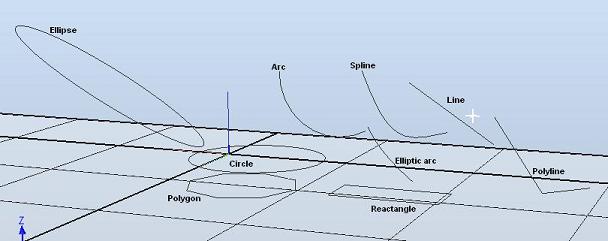
Solution
Create a Part object to contain the bodies and add it to the Station
Part p = new Part();
p.Name = "My_Curves";
station.GraphicComponents.Add(p);
Create an arc
Vector3 start = new Vector3(0.0, 0.0, 0.0);
Vector3 end = new Vector3(0.5, 0.5, 0.5);
Vector3 via = new Vector3(0.25, 0.25, 0.0);
Body b1 = Body.CreateArc(start, end, via);
b1.Name = "Arc";
p.Bodies.Add(b1);
Create a circle
Matrix4 matrix_origo = new Matrix4(new Vector3(Axis.X), 0.0);
Body b2 = Body.CreateCircle(matrix_origo, 0.5);
b2.Name = "Circle";
p.Bodies.Add(b2);
Create an ellipse
Vector3 vector_origo = new Vector3(0.0, 0.0, 0.0);
Body b3 = Body.CreateEllipse(vector_origo, end, 0.25);
b3.Name = "Ellipse";
p.Bodies.Add(b3);
Create an elliptic arc
Body b4 = Body.CreateEllipticArc(vector_origo, end, via, 0.3, 1.1);
b4.Name = "Elliptic arc";
p.Bodies.Add(b4);
Create a line
Body b5 = Body.CreateLine(start, end);
b5.Name = "Line";
p.Bodies.Add(b5);
Create a polygon
Body b6 = Body.CreatePolygon(vector_origo, via, 8);
b6.Name = "Polygon";
p.Bodies.Add(b6);
Create a polyline
Vector3[] vertices = new Vector3[3] { start, via, end };
Body b7 = Body.CreatePolyLine(vertices);
b7.Name = "Polyline";
p.Bodies.Add(b7);
Create a reactangle
Body b8 = Body.CreateRectangle(matrix_origo, 0.7, 0.3);
b8.Name = "Reactangle";
p.Bodies.Add(b8);
Create a spline
Body b9 = Body.CreateSpline(vertices, 0.2);
b9.Name = "Spline";
p.Bodies.Add(b9);
Example
This example shows a variety of curves.
Project.UndoContext.BeginUndoStep("BodyCreateCurves");
try
{
    Station station = Station.ActiveStation;

    // Create a part to contain the bodies.
    Part p = new Part();
    p.Name = "My_Curves";
    station.GraphicComponents.Add(p);

    // Create an arc.
    Vector3 start = new Vector3(0.0, 0.0, 0.0);
    Vector3 end = new Vector3(0.5, 0.5, 0.5);
    Vector3 via = new Vector3(0.25, 0.25, 0.0);
    Body b1 = Body.CreateArc(start, end, via);
    b1.Name = "Arc";
    p.Bodies.Add(b1);

    // Create a circle.
    Matrix4 matrix_origo = new Matrix4(new Vector3(Axis.X), 0.0);
    Body b2 = Body.CreateCircle(matrix_origo, 0.5);
    b2.Name = "Circle";
    p.Bodies.Add(b2);

    // Create an ellipse.
    Vector3 vector_origo = new Vector3(0.0, 0.0, 0.0);
    Body b3 = Body.CreateEllipse(vector_origo, end, 0.25);
    b3.Name = "Ellipse";
    p.Bodies.Add(b3);

    // Create an elliptic arc.
    Body b4 = Body.CreateEllipticArc(vector_origo, end, via, 0.3, 1.1);
    b4.Name = "Elliptic arc";
    p.Bodies.Add(b4);

    // Create a line.
    Body b5 = Body.CreateLine(start, end);
    b5.Name = "Line";
    p.Bodies.Add(b5);

    // Create a polygon.
    Body b6 = Body.CreatePolygon(vector_origo, via, 8);
    b6.Name = "Polygon";
    p.Bodies.Add(b6);

    // Create a polyline.
    Vector3[] vertices = new Vector3[3] { start, via, end };
    Body b7 = Body.CreatePolyLine(vertices);
    b7.Name = "Polyline";
    p.Bodies.Add(b7);

    // Create a reactangle.
    Body b8 = Body.CreateRectangle(matrix_origo, 0.7, 0.3);
    b8.Name = "Reactangle";
    p.Bodies.Add(b8);

    // Create a spline.
    Body b9 = Body.CreateSpline(vertices, 0.2);
    b9.Name = "Spline";
    p.Bodies.Add(b9);
}
catch
{
    Project.UndoContext.CancelUndoStep(CancelUndoStepType.Rollback);
    throw;
}
finally
{
    Project.UndoContext.EndUndoStep();
}
Required Namespaces
ABB.Robotics.RobotStudio.Stations