Release Notes for RobotStudio SDK 2021.2
General
The release name is RobotStudio SDK 2021.2 and the build number is 21.2.9526.0. The release date is July 1, 2021.
What's new in RobotStudio SDK 2021.2
Hyperlinks in output view
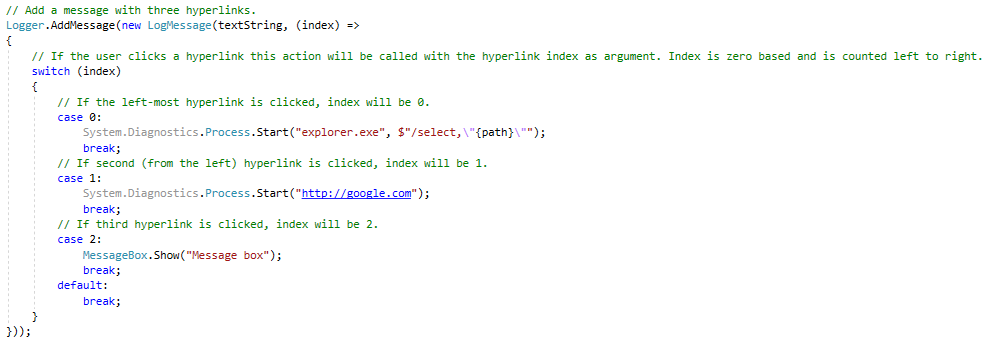
It is now possible to create log messages with clickable hyperlinks, visible in the output window.
The index of the clicked hyperlink is passed to the RequestNavigate action.
Example:
API changes from RobotStudio SDK 2021.1
Added Types
| Namespace | Type | Description |
|---|---|---|
| ABB.Robotics.RobotStudio.UI | DropFeedback | Specifies visual feedback when the user drags an object over a WpfTreeView. |
Added Members
ABB.Robotics.RobotStudio
| Type | Member | Description |
|---|---|---|
| RobotStudioAPI | RunOnMainThread(Action, bool) | Runs an action on the main (GUI) application thread. |
ABB.Robotics.RobotStudio.Controllers
| Type | Member | Description |
|---|---|---|
| ControllerReferenceCollection | Add(Guid, bool) | Connects to the specified controller and adds it to the RobotStudio user interface. |
| Add(string, bool) | Connects to the specified controller and adds it to the RobotStudio user interface. |
ABB.Robotics.RobotStudio.Documents
| Type | Member | Description |
|---|---|---|
| SolutionDocumentProvider | SolutionDocumentProvider(string, Func<string>, string, string) | Constructor. |
ABB.Robotics.RobotStudio.Environment
| Type | Member | Description |
|---|---|---|
| UIEnvironment | LoadWindowConfiguration(TextReader, IEnumerable<string>) | Loads a window and toolbar configuration from a stream |
ABB.Robotics.RobotStudio.Stations
| Type | Member | Description |
|---|---|---|
| MeshBody | CreateSurfacePolygon(IEnumerable<Vector3>) | Creates a surface polygon MeshBody. |
ABB.Robotics.RobotStudio.UI
| Type | Member | Description |
|---|---|---|
| WpfTreeView | FirstColumnVisible | Specifies if the column representing the tree itself shall be visible. |