Modifying Local Origin
This example provides information on modifying the local coordinate position and orientation of a Part.
Before Local Origin Change
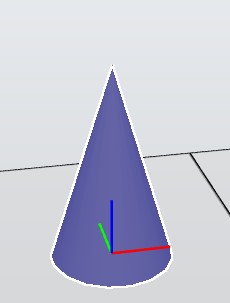
After Local Origin Change
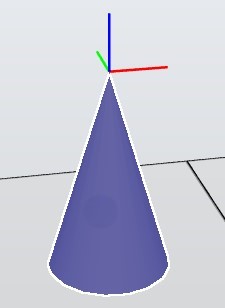
Solution
Save the current GlobalMatrix of the Part.
// Save the current global transformation matrix of the part
Matrix4 oldGlobalMatrix = part.Transform.GlobalMatrix;
Get the reference Transform of the part's parent, if it exists. This step ensures that transformations are relative to the parent coordinate system.
// Get the parent's global transformation, if it exists
Transform refTrf = (part.Parent as IHasTransform)?.Transform;
Create a new identity matrix and apply the position and orientation arguments to it using Translation and EulerZYX. Then, update the part's global transformation matrix.
// Create and set the new transformation matrix for the part
Matrix4 mat = Matrix4.Identity;
mat.Translation = position;
mat.EulerZYX = orientation;
part.Transform.GlobalMatrix = (refTrf == null) ? mat : (refTrf.GlobalMatrix * mat);
Calculate the transformation difference by comparing the new global matrix to the old one.
// Calculate the transformation difference
Matrix4 newGlobalMatrix = part.Transform.GlobalMatrix;
newGlobalMatrix.InvertRigid();
Matrix4 diffTrans = newGlobalMatrix * oldGlobalMatrix;
Move all bodies back to their original positions using the transformation difference. If the part has geometry, apply the transformation to each body. Otherwise, apply it to the entire mesh.
// Move all the bodies back to the original position
if (part.HasGeometry)
{
    foreach (Body bd in part.Bodies)
    {
        bd.Transform.Matrix = diffTrans * bd.Transform.Matrix;
    }
}
else
{
    part.Mesh.Transform(diffTrans);
    part.Mesh.Rebuild();
}
Example
This function returns typesafe collection of all the Part objects in station.
private static List<Part> GetStationParts()
{
    var parts = new List<Part>();
    foreach (var component in Station.ActiveStation.GraphicComponents)
    {
        if (component is Part part)
        {
            parts.Add(part);
        }
    }
    return parts;
}
This is an example of how the local origin can be modified.
private static void ApplyLocalChange(Part part, Vector3 position, Vector3 orientation)
{
    Project.UndoContext.BeginUndoStep();
    try
    {
        if (part != null)
        {
            // Save the current global transformation matrix of the part
            Matrix4 oldGlobalMatrix = part.Transform.GlobalMatrix;

            // Get the parent's global transformation, if it exists
            Transform refTrf = (part.Parent as IHasTransform)?.Transform;

            // Create and set the new transformation matrix for the part
            Matrix4 mat = Matrix4.Identity;
            mat.Translation = position;
            mat.EulerZYX = orientation;
            part.Transform.GlobalMatrix = (refTrf == null) ? mat : (refTrf.GlobalMatrix * mat);

            // Calculate the transformation difference
            Matrix4 newGlobalMatrix = part.Transform.GlobalMatrix;
            newGlobalMatrix.InvertRigid();
            Matrix4 diffTrans = newGlobalMatrix * oldGlobalMatrix;

            // Move all the bodies back to the original position
            if (part.HasGeometry)
            {
                foreach (Body bd in part.Bodies)
                {
                    bd.Transform.Matrix = diffTrans * bd.Transform.Matrix;
                }
            }
            else
            {
                part.Mesh.Transform(diffTrans);
                part.Mesh.Rebuild();
            }
        }
    }
    catch
    {
        Project.UndoContext.CancelUndoStep(CancelUndoStepType.Rollback);
        throw;
    }
    finally
    {
        Project.UndoContext.EndUndoStep();
    }
}
This is an example of how ApplyLocalChange can be used:
// Get all CAD parts from station
List<Part> partList = GetStationParts();

// Set new position
Vector3 position = new Vector3(2.0, 2.0, 2.0);

// Set new orientation
Vector3 orientation = new Vector3(Globals.DegToRad(90), Globals.DegToRad(30), Globals.DegToRad(30));

// Adjust local origin
foreach (Part part in partList)
{
    ApplyLocalChange(part, position, orientation);
}
Required Namespaces
ABB.Robotics.RobotStudio.Stations