Release Notes for RobotStudio SDK 2023.2
General
The release name is RobotStudio SDK 2023.2 and the build number is 23.2.10395.0. The build date is June 26, 2023.
New Functionality
WpfTreeView status icons
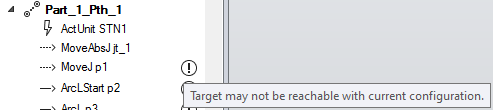
The WpfTreeView control now supports additional icons that are displayed right-aligned beside a tree node. These can be used for example to display status information for an object. Each icon can have a separate tooltip.
The icons are added by calling WpfTreeNode.SetStatusIcon() or WpfTreeNode.SetStatusIcons().
API changes from RobotStudio SDK 2023.1
Added Types
| Namespace | Type | Description |
|---|---|---|
| ABB.Robotics.RobotStudio.UI | WpfTreeStatusIcon | Represents an image with an optional tooltip that is displayed beside the tree node. |
Added Members
ABB.Robotics.RobotStudio.Environment
| Type | Member | Description |
|---|---|---|
| CommandBarControl | LargeThemedImage | Gets the control's large image, recolored for use in the ribbon according to the current theme. |
| ThemedImage | Gets the control's image, recolored for use in the ribbon according to the current theme. | |
| DocumentWindow | Maximize() | Maximize the window. Only relevant for floating windows. |
| Maximized | Returns if window is in maximized state. Only relevant for floating windows. | |
| Restore() | Restore the window from maximized to normal. Only relevant for floating windows. | |
| RibbonGroup | LargeThemedImage | Gets the group's large image, recolored for use in the ribbon according to the current theme. |
| ThemedImage | Gets the group's image, recolored for use in the ribbon according to the current theme. |
ABB.Robotics.RobotStudio.Stations
| Type | Member | Description |
|---|---|---|
| KnownAttributeKey | NoDefaultInitialization | Indicates that a property should not be initialized to a default value when it is added to a component. |
ABB.Robotics.RobotStudio.Stations.Forms
| Type | Member | Description |
|---|---|---|
| AfterFreehandEventArgs | JogMode | Gets if joint values of the object were changed, rather than its position or orientation. |
| GraphicButtonCollection | Add(string, int, int, Bitmap, int, int) | Creates a new GraphicButton and adds it to this collection. |
| GraphicPickEventArgs | PickedTangent | Gets the tangent at the picked position in global coordinates. |
ABB.Robotics.RobotStudio.UI
| Type | Member | Description |
|---|---|---|
| WpfTreeNode | SetStatusIcon(WpfTreeStatusIcon) | Sets an optional image that is displayed right aligned beside the node. |
| SetStatusIcons(IEnumerable<WpfTreeStatusIcon>) | Sets zero or more optional images that are displayed right aligned beside the node. | |
| WpfTreeView | ShowExpandCollapse | Shows a command in the toolbar for expanding or collapsing all items in the tree view. |
| ShowSearch | Shows a search box in the toolbar for filtering the tree view. |
Obsolete Types and Members
| Namespace | Type | Member |
|---|---|---|
| ABB.Robotics.RobotStudio.Environment | RibbonControlLayout | Inline |
| ABB.Robotics.RobotStudio.Stations.Forms | FreehandMode | JogLinear |
| JogReorient |