openapi: 3.0.1
info:
description: |
Panel Service
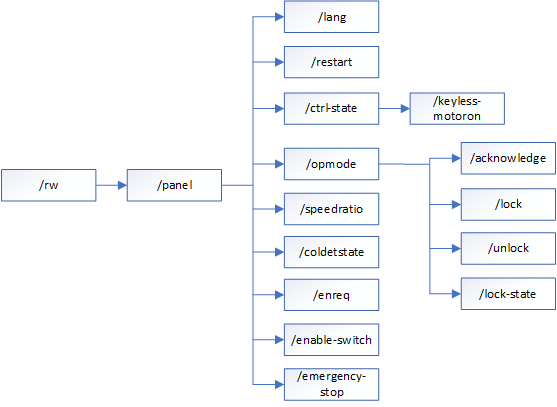
version: 3HAC073675-001 Revision:L
title: Robot Web Services
tags:
- name: Controller Language Settings
description: ''
- name: Restarting Controller Options
description: ''
- name: Controller State Activities
description: ''
- name: Actions on Controller-Operation Mode
description: ''
- name: Speed Ratio Control and Retrieve
description: ''
- name: Collision Detection Activities
description: ''
- name: Enabling Device Requirement
description: ''
- name: Toggle Enable Switch
description: ''
- name: Controller Stopping Options
description: ''
components:
requestBodies:
RequestBody:
content:
application/x-www-form-urlencoded;v=2.0:
schema:
type: object
required:
- state
properties:
state:
description: on | off
type: string
example: state=string
description: Data parameter(s)
securitySchemes:
basicAuth:
type: http
scheme: basic
servers:
- url: https://127.0.0.1
description: Localhost VC
- url: https://192.168.125.1
description: RC MGMT connection
paths:
/rw/panel:
get:
tags:
- Panel Service Listings
summary: Get Panel Resources
description: >
**Description :**
Get a list of panel resources.
**Pre-requisites :** None
**Limitation :** None
**Sample Curl Call :**
curl -u "Default User":robotics -H "accept: application/xhtml+xml;v=2.0"
"https://localhost/rw/panel"
**Example java script :**
```
const https = require('https')
process.env.NODE_TLS_REJECT_UNAUTHORIZED = "0";
//provide the user id and passowrd
let encoded = Buffer.from("Default user:robotics").toString('base64')
var auth = "Basic " + encoded;
const options = {
hostname: 'localhost',
port: 443,
path: '/rw/panel',
method: 'GET',
headers:{
'Accept': 'application/hal+json;v=2.0',
'Authorization': auth
}
}
const req = https.request(options, res => {
console.log(`statusCode: ${res.statusCode}`)
res.on('data', d => {
process.stdout.write(d)
})
})
req.on('error', error => {
console.error(error)
})
req.end()
```
responses:
'200':
description: Standard response for successful HTTP requests
content:
application/xhtml+xml;v=2.0:
schema:
properties:
pnl-ctrlstate-li:
description: The controller state resource
pnl-opmode-li:
description: The Operation mode resource
pnl-speedratio-li:
description: The Speed ratio resource
pnl-coldetstate-li:
description: The Colision detection state resource
ctrl-state:
description: controller state information {motorOn | motorOff}
opmode:
description: operating mode of the controller {manual | auto}
speedratio:
description: speedratio in which the controller is operating
coldetstate:
description: >-
The collision detection states {INIT | TRIGGERED |
CONFIRMED | TRIGGERED_ACK}
pnl-enreq-li:
description: The Enabling device resource
xml:
name: data
wrapped: true
examples:
response:
value: |
application/hal+json;v=2.0:
schema:
properties:
pnl-ctrlstate-li:
description: The controller state resource
pnl-opmode-li:
description: The Operation mode resource
pnl-speedratio-li:
description: The Speed ratio resource
pnl-coldetstate-li:
description: The Colision detection state resource
ctrl-state:
description: controller state information {motorOn | motorOff}
opmode:
description: operating mode of the controller {manual | auto}
speedratio:
description: speedratio in which the controller is operating
coldetstate:
description: >-
The collision detection states {INIT | TRIGGERED |
CONFIRMED | TRIGGERED_ACK}
pnl-enreq-li:
description: The Enabling device resource
xml:
name: data
wrapped: true
'406':
description: >-
The server can only generate a response that is not accepted by the
client
security:
- basicAuth: []
/rw/panel/opmode:
get:
tags:
- Actions on Controller-Operation Mode
summary: Get Controller-Operation Mode
description: >
**Description :**
Get the operation mode of the controller.
The resource can be subscribed (controller operation Mode change) using
/subscription with resource uri /rw/panel/opmode
**Pre-requisites :** None
**Limitation :** None
**Sample Curl Call :**
curl -u "Default User":robotics -H "accept: application/xhtml+xml;v=2.0"
"https://localhost/rw/panel/opmode"
**Example java script :**
```
const https = require('https')
process.env.NODE_TLS_REJECT_UNAUTHORIZED = "0";
//provide the user id and passowrd
let encoded = Buffer.from("Default user:robotics").toString('base64')
var auth = "Basic " + encoded;
const options = {
hostname: 'localhost',
port: 443,
path: '/rw/panel/opmode',
method: 'GET',
headers:{
'Accept': 'application/hal+json;v=2.0',
'Authorization': auth
}
}
const req = https.request(options, res => {
console.log(`statusCode: ${res.statusCode}`)
res.on('data', d => {
process.stdout.write(d)
})
})
req.on('error', error => {
console.error(error)
})
req.end()
```
**Sample response for controller operation Mode change subscription**
```
```
responses:
'200':
description: Standard response for successful HTTP requests
content:
application/xhtml+xml;v=2.0:
schema:
properties:
opmode:
description: >-
The operation mode {INIT | AUTO_CH | MANF_CH | MANR | MANF
| AUTO | UNDEF}. INIT-State init. AUTO_CH-State change
request for automatic mode. MANF_CH-State change request
for manual mode & full speed. MANR-State manual mode &
reduced speed. MANF-State manual mode & full speed.
AUTO-State automatic mode. UNDEF-Undefined.
xml:
name: data
wrapped: true
examples:
response:
value: |
application/hal+json;v=2.0:
schema:
properties:
opmode:
description: >-
The operation mode {INIT | AUTO_CH | MANF_CH | MANR | MANF
| AUTO | UNDEF}. INIT-State init. AUTO_CH-State change
request for automatic mode. MANF_CH-State change request
for manual mode & full speed. MANR-State manual mode &
reduced speed. MANF-State manual mode & full speed.
AUTO-State automatic mode. UNDEF-Undefined.
xml:
name: data
wrapped: true
'406':
description: >-
The server can only generate a response that is not accepted by the
client
security:
- basicAuth: []
post:
tags:
- Actions on Controller-Operation Mode
summary: Set Controller-Operation Mode
description: >
**Description :**
Set the Operation Mode of the Controller.
**Pre-requisites :** None
**Limitation :**
* Client should have Local Client privileges to execute the functionality.
**Sample Curl Call :**
curl -u "Default User":robotics -H "Content-Type:
application/x-www-form-urlencoded;v=2.0" -d "opmode=auto" -X POST
"https://localhost/rw/panel/opmode"
**Example java script :**
```
const https = require('https')
//To disable SSL
process.env.NODE_TLS_REJECT_UNAUTHORIZED = "0";
//provide the user id and passowrd
let encoded = Buffer.from("Default user:robotics").toString('base64')
const data = 'const data = {
opmode: {string}
}';
var auth = "Basic " + encoded;
const options = {
hostname: 'localhost',
port: 443,
path: '/rw/panel/opmode',
method: 'POST',
headers:{
'Accept': 'application/hal+json;v=2.0',
'Content-Type': 'application/x-www-form-urlencoded;v=2.0',
'Authorization': auth,
'Content-Length': data.length
}
}
const req = https.request(options, res => {
console.log(`statusCode: ${res.statusCode}`)
res.on('data', d => {
process.stdout.write(d)
console.log(res.headers.location)
})
})
req.on('error', error => {
console.error(error)
})
req.write(data)
req.end()
```
requestBody:
content:
application/x-www-form-urlencoded;v=2.0:
schema:
type: object
required:
- opmode
properties:
opmode:
description: operation modes are {auto | man | manf}
type: string
example: opmode=string
description: Data parameter(s)
responses:
'202':
description: The request has been successfully Accepted
'400':
description: The request cannot be fulfilled due to bad syntax
'403':
description: >-
The request was a legal request, but the server is refusing to
respond to it
'415':
description: >-
The server will not accept the request, because the media type is
not supported
security:
- basicAuth: []
/rw/panel/enreq:
get:
tags:
- Enabling Device Requirement
summary: Get Enabling Device Required State
description: >
**Description :**
Get the enabling device required state.
**Pre-requisites :** None
**Limitation :** None
**Sample Curl Call :**
curl -u "Default User":robotics -H "accept: application/xhtml+xml;v=2.0"
"https://localhost/rw/panel/enreq"
**Example java script :**
```
const https = require('https')
process.env.NODE_TLS_REJECT_UNAUTHORIZED = "0";
//provide the user id and passowrd
let encoded = Buffer.from("Default user:robotics").toString('base64')
var auth = "Basic " + encoded;
const options = {
hostname: 'localhost',
port: 443,
path: '/rw/panel/enreq',
method: 'GET',
headers:{
'Accept': 'application/hal+json;v=2.0',
'Authorization': auth
}
}
const req = https.request(options, res => {
console.log(`statusCode: ${res.statusCode}`)
res.on('data', d => {
process.stdout.write(d)
})
})
req.on('error', error => {
console.error(error)
})
req.end()
```
responses:
'200':
description: Standard response for successful HTTP requests
content:
application/xhtml+xml;v=2.0:
schema:
properties:
enreq:
description: >-
The Enabling device required state {0 | 1}. 0 represents
not required and 1 represents required.
xml:
name: data
wrapped: true
examples:
response:
value: |
application/hal+json;v=2.0:
schema:
properties:
enreq:
description: >-
The Enabling device required state {0 | 1}. 0 represents
not required and 1 represents required.
xml:
name: data
wrapped: true
'406':
description: >-
The server can only generate a response that is not accepted by the
client
security:
- basicAuth: []
/rw/panel/coldetstate:
get:
tags:
- Collision Detection Activities
summary: Get Collision Detection State
description: >
**Description :**
Get the collision detection state of the controller. It can be subscribed using POST /subscription with resource uri /rw/panel/coldetstate
**Pre-requisites :** None
**Limitation :** None
**Sample Curl Call :**
curl -u "Default User":robotics -H "accept: application/xhtml+xml;v=2.0"
"https://localhost/rw/panel/coldetstate"
**Example java script :**
```
const https = require('https')
process.env.NODE_TLS_REJECT_UNAUTHORIZED = "0";
//provide the user id and passowrd
let encoded = Buffer.from("Default user:robotics").toString('base64')
var auth = "Basic " + encoded;
const options = {
hostname: 'localhost',
port: 443,
path: '/rw/panel/coldetstate',
method: 'GET',
headers:{
'Accept': 'application/hal+json;v=2.0',
'Authorization': auth
}
}
const req = https.request(options, res => {
console.log(`statusCode: ${res.statusCode}`)
res.on('data', d => {
process.stdout.write(d)
})
})
req.on('error', error => {
console.error(error)
})
req.end()
```
responses:
'200':
description: Standard response for successful HTTP requests
content:
application/xhtml+xml;v=2.0:
schema:
properties:
coldetstate:
description: >-
The collision detection states {INIT | TRIGGERED |
CONFIRMED | TRIGGERED_ACK}
xml:
name: data
wrapped: true
examples:
response:
value: |
application/hal+json;v=2.0:
schema:
properties:
coldetstate:
description: >-
The collision detection states {INIT | TRIGGERED |
CONFIRMED | TRIGGERED_ACK}
xml:
name: data
wrapped: true
'406':
description: >-
The server can only generate a response that is not accepted by the
client
security:
- basicAuth: []
/rw/panel/speedratio:
get:
tags:
- Speed Ratio Control and Retrieve
summary: Get Speed Ratio
description: >
**Description :**
Get the speed ratio.
**Pre-requisites :** None
**Limitation :** None
**Sample Curl Call :**
curl -u "Default User":robotics -H "accept: application/xhtml+xml;v=2.0"
"https://localhost/rw/panel/speedratio"
**Example java script :**
```
const https = require('https')
process.env.NODE_TLS_REJECT_UNAUTHORIZED = "0";
//provide the user id and passowrd
let encoded = Buffer.from("Default user:robotics").toString('base64')
var auth = "Basic " + encoded;
const options = {
hostname: 'localhost',
port: 443,
path: '/rw/panel/speedratio',
method: 'GET',
headers:{
'Accept': 'application/hal+json;v=2.0',
'Authorization': auth
}
}
const req = https.request(options, res => {
console.log(`statusCode: ${res.statusCode}`)
res.on('data', d => {
process.stdout.write(d)
})
})
req.on('error', error => {
console.error(error)
})
req.end()
```
responses:
'200':
description: Standard response for successful HTTP requests
content:
application/xhtml+xml;v=2.0:
schema:
properties:
speedratio:
description: The speed ratio value. {0-100}
xml:
name: data
wrapped: true
examples:
response:
value: |
application/hal+json;v=2.0:
schema:
properties:
speedratio:
description: The speed ratio value. {0-100}
xml:
name: data
wrapped: true
'406':
description: >-
The server can only generate a response that is not accepted by the
client
security:
- basicAuth: []
post:
tags:
- Speed Ratio Control and Retrieve
summary: Set Speed Ratio
description: "**Description :** \n\n Set the controller speed ratio.\n\n The resource can be subscribed (Speed Ratio changes) using /subscription with resource uri /rw/panel/speedratio\n\n**Pre-requisites :** \n * Mastership is required. \n\n**Limitation :** \n * The value should be between 0 and 100\r\n\n * Only supported in auto mode \n\n**Sample Curl Call :**\n\ncurl -u \"Default User\":robotics -H \"Content-Type: application/x-www-form-urlencoded;v=2.0\" -d \"speed-ratio=60\" -X POST \"https://localhost/rw/panel/speedratio\"\n\n**Example java script :** \n```\nconst https = require('https')\n//To disable SSL\nprocess.env.NODE_TLS_REJECT_UNAUTHORIZED = \"0\";\n//provide the user id and passowrd\nlet encoded = Buffer.from(\"Default user:robotics\").toString('base64')\nconst data = 'const data = {\n speed-ratio: {string} \n}';\nvar auth = \"Basic \" + encoded;\nconst options = {\n hostname: 'localhost',\n port: 443,\n path: '/rw/panel/speedratio',\n method: 'POST',\n headers:{\n 'Accept': 'application/hal+json;v=2.0',\n 'Content-Type': 'application/x-www-form-urlencoded;v=2.0',\n 'Authorization': auth,\n 'Content-Length': data.length\n }\n}\nconst req = https.request(options, res => {\n console.log(`statusCode: ${res.statusCode}`)\n res.on('data', d => {\n process.stdout.write(d)\n console.log(res.headers.location)\n})\n})\n req.on('error', error => {\n console.error(error)\n })\n req.write(data)\n req.end()\n```\n\n\n**Sample response for Speed Ratio changes subscription**\n\n \n```\n\n \n \n \n \n \n \n \n```\n"
parameters:
- name: mastership
in: query
description: '{implicit | explicit} by default mastership is explicit'
required: false
schema:
type: string
requestBody:
content:
application/x-www-form-urlencoded;v=2.0:
schema:
type: object
required:
- speed-ratio
properties:
speed-ratio:
description: The speed ratio value between 0 and 100
type: string
example: speed-ratio=string
description: Data parameter(s)
responses:
'204':
description: >-
The request has been successfully processed, but is not returning
any content
'400':
description: The request cannot be fulfilled due to bad syntax
'403':
description: >-
The request was a legal request, but the server is refusing to
respond to it
'415':
description: >-
The server will not accept the request, because the media type is
not supported
security:
- basicAuth: []
/rw/panel/restart:
post:
tags:
- Restarting Controller Options
summary: Restart the Controller
description: >
**Description :**
Restart the controller based on different restart modes.
**Pre-requisites :**
* Mastership is required for all domains
**Limitation :**
* In manual mode, login as local client and obtain mastership privileges for all domains to execute the API.
**Sample Curl Call :**
curl -u "Default User":robotics -H "Content-Type:
application/x-www-form-urlencoded;v=2.0" -d "restart-mode=restart" -X
POST "https://localhost/rw/panel/restart"
**Example java script :**
```
const https = require('https')
//To disable SSL
process.env.NODE_TLS_REJECT_UNAUTHORIZED = "0";
//provide the user id and passowrd
let encoded = Buffer.from("Default user:robotics").toString('base64')
const data = 'const data = {
restart-mode: {string}
}';
var auth = "Basic " + encoded;
const options = {
hostname: 'localhost',
port: 443,
path: '/rw/panel/restart',
method: 'POST',
headers:{
'Accept': 'application/hal+json;v=2.0',
'Content-Type': 'application/x-www-form-urlencoded;v=2.0',
'Authorization': auth,
'Content-Length': data.length
}
}
const req = https.request(options, res => {
console.log(`statusCode: ${res.statusCode}`)
res.on('data', d => {
process.stdout.write(d)
console.log(res.headers.location)
})
})
req.on('error', error => {
console.error(error)
})
req.write(data)
req.end()
```
parameters:
- name: mastership
in: query
description: '{implicit | explicit} by default mastership is explicit'
required: false
schema:
type: string
requestBody:
content:
application/x-www-form-urlencoded;v=2.0:
schema:
type: object
required:
- restart-mode
properties:
restart-mode:
description: restart modes are {restart | istart | pstart | bstart}
type: string
example: restart-mode=string
description: Data parameter(s)
responses:
'204':
description: >-
The request has been successfully processed, but is not returning
any content
'400':
description: The request cannot be fulfilled due to bad syntax
'403':
description: >-
The request was a legal request, but the server is refusing to
respond to it
'415':
description: >-
The server will not accept the request, because the media type is
not supported
security:
- basicAuth: []
/rw/panel/ctrl-state:
get:
tags:
- Controller State Activities
summary: Get Controller State
description: >
**Description :**
Get the controller state.
**Pre-requisites :** None
**Limitation :** None
**Sample Curl Call :**
curl -u "Default User":robotics -H "accept: application/xhtml+xml;v=2.0"
"https://localhost/rw/panel/ctrl-state"
**Example java script :**
```
const https = require('https')
process.env.NODE_TLS_REJECT_UNAUTHORIZED = "0";
//provide the user id and passowrd
let encoded = Buffer.from("Default user:robotics").toString('base64')
var auth = "Basic " + encoded;
const options = {
hostname: 'localhost',
port: 443,
path: '/rw/panel/ctrl-state',
method: 'GET',
headers:{
'Accept': 'application/hal+json;v=2.0',
'Authorization': auth
}
}
const req = https.request(options, res => {
console.log(`statusCode: ${res.statusCode}`)
res.on('data', d => {
process.stdout.write(d)
})
})
req.on('error', error => {
console.error(error)
})
req.end()
```
responses:
'200':
description: Standard response for successful HTTP requests
content:
application/xhtml+xml;v=2.0:
schema:
properties:
ctrlstate:
description: >-
The controller state. {init | motoron | motoroff |
guardstop | emergencystop | emergencystopreset | sysfail}.
init-The robot is starting up. It will shift to state
motors off when it has started. motoroff-The robot is in a
standby state where there is no power to the robot's
motors. The state has to be shifted to motors on before
the robot can move. motoron-The robot is ready to move,
either by jogging or by running programs. guardstop-The
robot is stopped because the safety runchain is opened.
For instance, a door to the robot's cell might be open.
emergencystop-The robot is stopped because emergency stop
was activated. emergencystopreset-The robot is ready to
leave emergency stop state. The emergency stop is no
longer activated, but the state transition isn't yet
confirmed. sysfail-The robot is in a system failure state.
Restart required.
xml:
name: data
wrapped: true
examples:
response:
value: |
application/hal+json;v=2.0:
schema:
properties:
ctrlstate:
description: >-
The controller state. {init | motoron | motoroff |
guardstop | emergencystop | emergencystopreset | sysfail}.
init-The robot is starting up. It will shift to state
motors off when it has started. motoroff-The robot is in a
standby state where there is no power to the robot's
motors. The state has to be shifted to motors on before
the robot can move. motoron-The robot is ready to move,
either by jogging or by running programs. guardstop-The
robot is stopped because the safety runchain is opened.
For instance, a door to the robot's cell might be open.
emergencystop-The robot is stopped because emergency stop
was activated. emergencystopreset-The robot is ready to
leave emergency stop state. The emergency stop is no
longer activated, but the state transition isn't yet
confirmed. sysfail-The robot is in a system failure state.
Restart required.
xml:
name: data
wrapped: true
'406':
description: >-
The server can only generate a response that is not accepted by the
client
security:
- basicAuth: []
post:
tags:
- Controller State Activities
summary: Set the Controller State
description: >
**Description :**
Set the controller state in either Motors ON or Motors OFF.
+ The Motors On state change is triggered when the controller operates in Auto mode for both VC and RC or the connected robot is a Single Arm Yumi (IRB14050/ **SAY**).
+ In case of VC or for non SAY controllers Motors on state change will be initiated by invoking "**Set Enable Switch**" API
The resource can be subscribed (controller state changes) using
/subscription with resource uri /rw/panel/ctrl-state
-init- The robot is starting up. It will shift to state motors off when
it has started.
-motoroff- The robot is in a standby state where there is no power to
the robot's motors. The state has to be shifted to motors on before the
robot can move.
-motoron- The robot is ready to move, either by jogging or by running
programs.
-guardstop- The robot is stopped because the safety runchain is opened.
For instance, a door to the robot's cell might be open.
-emergencystop- The robot is stopped because emergency stop was
activated.
-emergencystopreset- The robot is ready to leave emergency stop state.
The emergency stop is no longer activated, but the state transition
isn't yet confirmed.
-sysfail- The robot is in a system failure state. Restart required.
**Pre-requisites :**
* Should be logged in as local client in manual mode for few state changes
**Limitation :** None
**Sample Curl Call :**
curl -u "Default User":robotics -H "Content-Type:
application/x-www-form-urlencoded;v=2.0" -d "ctrl-state=motoroff" -X
POST "https://localhost/rw/panel/ctrl-state"
**Example java script :**
```
const https = require('https')
//To disable SSL
process.env.NODE_TLS_REJECT_UNAUTHORIZED = "0";
//provide the user id and passowrd
let encoded = Buffer.from("Default user:robotics").toString('base64')
const data = 'const data = {
ctrl-state: {string}
}';
var auth = "Basic " + encoded;
const options = {
hostname: 'localhost',
port: 443,
path: 'rw/panel/ctrl-state',
method: 'POST',
headers:{
'Accept': 'application/hal+json;v=2.0',
'Content-Type': 'application/x-www-form-urlencoded;v=2.0',
'Authorization': auth,
'Content-Length': data.length
}
}
const req = https.request(options, res => {
console.log(`statusCode: ${res.statusCode}`)
res.on('data', d => {
process.stdout.write(d)
console.log(res.headers.location)
})
})
req.on('error', error => {
console.error(error)
})
req.write(data)
req.end()
```
**Sample response for controller state changes subscription**
```
```
requestBody:
content:
application/x-www-form-urlencoded;v=2.0:
schema:
type: object
required:
- ctrl-state
properties:
ctrl-state:
description: The controller state {motoron | motoroff}
type: string
example: ctrl-state=string
description: Data parameter(s)
responses:
'204':
description: >-
The request has been successfully processed, but is not returning
any content
'400':
description: The request cannot be fulfilled due to bad syntax
'415':
description: >-
The server will not accept the request, because the media type is
not supported
security:
- basicAuth: []
/rw/panel/lang:
post:
tags:
- Controller Language Settings
summary: Set the Language
description: >
**Description :**
Set the language on the controller.
**Pre-requisites :** None
**Limitation :**
* Not available if controller is in SYSFAIL.
**Sample Curl Call :**
curl -u "Default User":robotics -H "Content-Type:
application/x-www-form-urlencoded;v=2.0" -d "lang-code=en" -X POST
"https://localhost/rw/panel/lang"
**Example java script :**
```
const https = require('https')
//To disable SSL
process.env.NODE_TLS_REJECT_UNAUTHORIZED = "0";
//provide the user id and passowrd
let encoded = Buffer.from("Default user:robotics").toString('base64')
const data = 'const data = {
lang-code: {string}
}';
var auth = "Basic " + encoded;
const options = {
hostname: 'localhost',
port: 443,
path: '/rw/panel/lang',
method: 'POST',
headers:{
'Accept': 'application/hal+json;v=2.0',
'Content-Type': 'application/x-www-form-urlencoded;v=2.0',
'Authorization': auth,
'Content-Length': data.length
}
}
const req = https.request(options, res => {
console.log(`statusCode: ${res.statusCode}`)
res.on('data', d => {
process.stdout.write(d)
console.log(res.headers.location)
})
})
req.on('error', error => {
console.error(error)
})
req.write(data)
req.end()
```
requestBody:
content:
application/x-www-form-urlencoded;v=2.0:
schema:
type: object
required:
- lang-code
properties:
lang-code:
description: The langauge code e.g. `en`, `sv`, `de` etc
type: string
example: lang-code=string
description: Data parameter(s)
responses:
'204':
description: >-
The request has been successfully processed, but is not returning
any content
'403':
description: >-
The request was a legal request, but the server is refusing to
respond to it
'415':
description: >-
The server will not accept the request, because the media type is
not supported
security:
- basicAuth: []
/rw/panel/opmode/acknowledge:
post:
tags:
- Actions on Controller-Operation Mode
summary: Acknowledge Controller-Operation Mode
description: >
**Description :**
Acknowledge the change in the operation mode of the controller.
**Pre-requisites :**
* Auto acknowledgement option should be deactivated.
**Limitation :**
* Client should have Local Client previliges to execute the functionality.
**Sample Curl Call :**
curl -u "Default User":robotics -H "Content-Type:
application/x-www-form-urlencoded;v=2.0" -d "opmode=auto" -X POST
"https://localhost/rw/panel/opmode/acknowledge"
**Example java script :**
```
const https = require('https')
//To disable SSL
process.env.NODE_TLS_REJECT_UNAUTHORIZED = "0";
//provide the user id and passowrd
let encoded = Buffer.from("Default user:robotics").toString('base64')
const data = 'const data = {
opmode: {string}
}';
var auth = "Basic " + encoded;
const options = {
hostname: 'localhost',
port: 443,
path: '/rw/panel/opmode/acknowledge',
method: 'POST',
headers:{
'Accept': 'application/hal+json;v=2.0',
'Content-Type': 'application/x-www-form-urlencoded;v=2.0',
'Authorization': auth,
'Content-Length': data.length
}
}
const req = https.request(options, res => {
console.log(`statusCode: ${res.statusCode}`)
res.on('data', d => {
process.stdout.write(d)
console.log(res.headers.location)
})
})
req.on('error', error => {
console.error(error)
})
req.write(data)
req.end()
```
requestBody:
content:
application/x-www-form-urlencoded;v=2.0:
schema:
type: object
required:
- opmode
properties:
opmode:
description: '{auto | manf | coldet}'
type: string
example: opmode=string
description: Data parameter(s)
responses:
'204':
description: >-
The request has been successfully processed, but is not returning
any content
'400':
description: The request cannot be fulfilled due to bad syntax
'403':
description: >-
The request was a legal request, but the server is refusing to
respond to it
'415':
description: >-
The server will not accept the request, because the media type is
not supported
security:
- basicAuth: []
/rw/panel/opmode/lock:
post:
tags:
- Actions on Controller-Operation Mode
summary: Lock Controller-Operation Mode
description: "**Description :** \n\n Lock operation mode selection.\n\n**Pre-requisites :** \n * UAS_GRANT \"Lock saftey controller config\" is needed to lock/unlock\r\n\n * For permenant lock/unlock \"Key-less mode selector\" UAS_GRANT is needed.\n\n**Limitation :** None \n\n**Sample Curl Call :** \n\ncurl -u \"Default User\":robotics -H \"Content-Type: application/x-www-form-urlencoded;v=2.0\" -d \"pin=1234&permanent=0\" -X POST \"https://localhost/rw/panel/opmode/lock\"\n\n**Example java script :** \n```\nconst https = require('https')\n//To disable SSL\nprocess.env.NODE_TLS_REJECT_UNAUTHORIZED = \"0\";\n//provide the user id and passowrd\nlet encoded = Buffer.from(\"Default user:robotics\").toString('base64')\nconst data = 'const data = {\n pin: {string},\n permanent: {string}\n}';\nvar auth = \"Basic \" + encoded;\nconst options = {\n hostname: 'localhost',\n port: 443,\n path: '/rw/panel/opmode/lock',\n method: 'POST',\n headers:{\n 'Accept': 'application/hal+json;v=2.0',\n 'Content-Type': 'application/x-www-form-urlencoded;v=2.0',\n 'Authorization': auth,\n 'Content-Length': data.length\n }\n}\nconst req = https.request(options, res => {\n console.log(`statusCode: ${res.statusCode}`)\n res.on('data', d => {\n process.stdout.write(d)\n console.log(res.headers.location)\n})\n})\n req.on('error', error => {\n console.error(error)\n })\n req.write(data)\n req.end()\n```\n"
requestBody:
content:
application/x-www-form-urlencoded;v=2.0:
schema:
type: object
required:
- pin
- permanent
properties:
pin:
description: <4-digit-pin>
type: string
permanent:
description: <1|0>
type: string
example: pin=string&permanent=string
description: Data parameter(s)
responses:
'204':
description: >-
The request has been successfully processed, but is not returning
any content
'400':
description: The request cannot be fulfilled due to bad syntax
'403':
description: >-
The request was a legal request, but the server is refusing to
respond to it
'415':
description: >-
The server will not accept the request, because the media type is
not supported
security:
- basicAuth: []
/rw/panel/opmode/unlock:
post:
tags:
- Actions on Controller-Operation Mode
summary: Unlock Controller-Operation Mode
description: >
**Description :**
Unlock operation mode selection.
**Pre-requisites :**
* UAS_GRANT "Lock saftey controller config" is needed to lock/unlock.
* For permenant lock/unlock "Key-less mode selector" UAS_GRANT is needed.
**Limitation :** None
**Sample Curl Call :**
curl -u "Default User":robotics -H "Content-Type:
application/x-www-form-urlencoded;v=2.0" -d "pin=1234" -X POST
"https://localhost/rw/panel/opmode/unlock"
**Example java script :**
```
const https = require('https')
//To disable SSL
process.env.NODE_TLS_REJECT_UNAUTHORIZED = "0";
//provide the user id and passowrd
let encoded = Buffer.from("Default user:robotics").toString('base64')
const data = 'const data = {
pin: {string}
}';
var auth = "Basic " + encoded;
const options = {
hostname: 'localhost',
port: 443,
path: '/rw/panel/opmode/unlock',
method: 'POST',
headers:{
'Accept': 'application/hal+json;v=2.0',
'Content-Type': 'application/x-www-form-urlencoded;v=2.0',
'Authorization': auth,
'Content-Length': data.length
}
}
const req = https.request(options, res => {
console.log(`statusCode: ${res.statusCode}`)
res.on('data', d => {
process.stdout.write(d)
console.log(res.headers.location)
})
})
req.on('error', error => {
console.error(error)
})
req.write(data)
req.end()
```
requestBody:
content:
application/x-www-form-urlencoded;v=2.0:
schema:
type: object
required:
- pin
properties:
pin:
description: <4-digit-pin>
type: string
example: pin=string
description: Data parameter(s)
responses:
'204':
description: >-
The request has been successfully processed, but is not returning
any content
'400':
description: The request cannot be fulfilled due to bad syntax
'403':
description: >-
The request was a legal request, but the server is refusing to
respond to it
'415':
description: >-
The server will not accept the request, because the media type is
not supported
security:
- basicAuth: []
/rw/panel/opmode/lock-state:
get:
tags:
- Actions on Controller-Operation Mode
summary: Get Controller-Operation Mode Lock Status
description: >
**Description :**
Get the Mode selector lock state.
**Pre-requisites :**
* The v=2.1 is supported from RW version 7.7.
**Limitation :** None
**Sample Curl Call :**
curl -u "Default User":robotics -H "accept: application/xhtml+xml;v=2.0"
"https://localhost/rw/panel/opmode/lock-state"
**Example java script :**
```
const https = require('https')
process.env.NODE_TLS_REJECT_UNAUTHORIZED = "0";
//provide the user id and passowrd
let encoded = Buffer.from("Default user:robotics").toString('base64')
var auth = "Basic " + encoded;
const options = {
hostname: 'localhost',
port: 443,
path: '/rw/panel/opmode/lock-state',
method: 'GET',
headers:{
'Accept': 'application/hal+json;v=2.0',
'Authorization': auth
}
}
const req = https.request(options, res => {
console.log(`statusCode: ${res.statusCode}`)
res.on('data', d => {
process.stdout.write(d)
})
})
req.on('error', error => {
console.error(error)
})
req.end()
```
responses:
'200':
description: Standard response for successful HTTP requests
content:
application/xhtml+xml;v=2.0:
schema:
properties:
lockstate:
description: >-
The Mode selector lock state gives { error | unlocked |
locked | permlocked | pendpermlocked}
xml:
name: data
wrapped: true
examples:
response:
value: |
application/hal+json;v=2.0:
schema:
properties:
lockstate:
description: >-
The Mode selector lock state gives { error | unlocked |
locked | permlocked | pendpermlocked}
xml:
name: data
wrapped: true
application/xhtml+xml;v=2.1:
schema:
properties:
lockstate:
description: >-
The Mode selector lock state gives { error | unlocked |
locked | permlocked | pendpermlocked}
xml:
name: data
wrapped: true
examples:
response:
value: |
application/hal+json;v=2.1:
schema:
properties:
lockstate:
description: >-
The Mode selector lock state gives { error | unlocked |
locked | permlocked | pendpermlocked}
xml:
name: data
wrapped: true
'406':
description: >-
The server can only generate a response that is not accepted by the
client
security:
- basicAuth: []
/rw/panel/ctrl-state/keyless-motoron:
post:
tags:
- Controller State Activities
summary: Keyless Motor ON
description: "**Description :** \n\n Set motor ON when using a keyless panel.\n\n**Pre-requisites :** None \n\n**Limitation :** None \n\n**Sample Curl Call :** \n\ncurl -u \"Default User\":robotics -H \"Content-Type: application/x-www-form-urlencoded;v=2.0\" -X POST \"https://localhost/rw/panel/ctrl-state/keyless-motoron\"\n\n**Example java script :** \n```\nconst https = require('https');\n //To disable SSL\n process.env.NODE_TLS_REJECT_UNAUTHORIZED = \"0\";\n const userId = process.env.USER_ID || 'Default user';\n const password = process.env.PASSWORD || 'robotics';\n let encoded = Buffer.from(`${userId}:${password}`).toString('base64');\n var auth = \"Basic \" + encoded;\n\n const options = {\n \t hostname: 'localhost',\n \t port: 443,\n \t path: '/rw/panel/ctrl-state/keyless-motoron',\n \t method: 'POST',\n \t headers: {\n \t\t 'Accept': 'application/hal+json;v=2.0',\n \t\t 'Content-Type': 'application/x-www-form-urlencoded;v=2.0',\n \t\t 'Authorization': auth\n \t }\n };\n\n const req = https.request(options, res => {\n \t console.log(`statusCode: {res.statusCode}`);\n \t let responseBody = '';\n \t res.on('data', d => {\n \t\t responseBody += d;\n \t });\n \t res.on('end', () => {\n \t console.log(responseBody);\n \t if (res.headers.location) {\n \t\t console.log(res.headers.location);\n \t }\n \t });\n });\n\n req.on('error', error => {\n \t console.error(error);\n });\n\n req.end();\n```\n"
responses:
'204':
description: >-
The request has been successfully processed, but is not returning
any content
'415':
description: >-
The server will not accept the request, because the media type is
not supported
security:
- basicAuth: []
/rw/panel/enable-switch:
post:
tags:
- Toggle Enable Switch
summary: Set Enable Switch
description: >
**Description :**
Set enable switch to either ON or OFF.
Invoking this API will set Controller Motor State to ON or OFF implicitly.
**Pre-requisites :**
+ Controller is in Manual Mode
+ Is not a Single Arm Yumi (SAY) Robot Controller
**Limitation :**
* Supported only in VC.
**Sample Curl Call :**
curl -u "Default User":robotics -H "Content-Type:
application/x-www-form-urlencoded;v=2.0" -d "state=on" -X POST
"https://localhost/rw/panel/enable-switch"
**Example java script :**
```
const https = require('https')
//To disable SSL
process.env.NODE_TLS_REJECT_UNAUTHORIZED = "0";
//provide the user id and passowrd
let encoded = Buffer.from("Default user:robotics").toString('base64')
const data = 'const data = {
state: {string}
}';
var auth = "Basic " + encoded;
const options = {
hostname: 'localhost',
port: 443,
path: '/rw/panel/enable-switch',
method: 'POST',
headers:{
'Accept': 'application/hal+json;v=2.0',
'Content-Type': 'application/x-www-form-urlencoded;v=2.0',
'Authorization': auth,
'Content-Length': data.length
}
}
const req = https.request(options, res => {
console.log(`statusCode: ${res.statusCode}`)
res.on('data', d => {
process.stdout.write(d)
console.log(res.headers.location)
})
})
req.on('error', error => {
console.error(error)
})
req.write(data)
req.end()
```
requestBody:
$ref: '#/components/requestBodies/RequestBody'
responses:
'204':
description: >-
The request has been successfully processed, but is not returning
any content
'400':
description: The request cannot be fulfilled due to bad syntax
'415':
description: >-
The server will not accept the request, because the media type is
not supported
security:
- basicAuth: []
/rw/panel/emergency-stop:
post:
tags:
- Controller Stopping Options
summary: Set Emergency Stop
description: >
**Description :**
Set emergency stop switch to either ON or OFF.
**Pre-requisites :** None
**Limitation :**
* Supported only in VC.
**Sample Curl Call :**
curl -u "Default User":robotics -H "Content-Type:
application/x-www-form-urlencoded;v=2.0" -d "state=on" -X POST
"https://localhost/rw/panel/emergency-stop"
**Example java script :**
```
const https = require('https')
//To disable SSL
process.env.NODE_TLS_REJECT_UNAUTHORIZED = "0";
//provide the user id and passowrd
let encoded = Buffer.from("Default user:robotics").toString('base64')
const data = 'const data = {
state: {string}
}';
var auth = "Basic " + encoded;
const options = {
hostname: 'localhost',
port: 443,
path: '/rw/panel/emergency-stop',
method: 'POST',
headers:{
'Accept': 'application/hal+json;v=2.0',
'Content-Type': 'application/x-www-form-urlencoded;v=2.0',
'Authorization': auth,
'Content-Length': data.length
}
}
const req = https.request(options, res => {
console.log(`statusCode: ${res.statusCode}`)
res.on('data', d => {
process.stdout.write(d)
console.log(res.headers.location)
})
})
req.on('error', error => {
console.error(error)
})
req.write(data)
req.end()
```
requestBody:
$ref: '#/components/requestBodies/RequestBody'
responses:
'204':
description: >-
The request has been successfully processed, but is not returning
any content
'400':
description: The request cannot be fulfilled due to bad syntax
'415':
description: >-
The server will not accept the request, because the media type is
not supported
security:
- basicAuth: []
/rw/panel/external-emergency-stop:
post:
tags:
- Controller Stopping Options
summary: Set External Emergency Stop
description: "**Description :** \n\n Set external emergency stop switch to either ON or OFF.\n\n**Pre-requisites :** None \n\n**Limitation :** \n * Supported only in VC\n\n**Sample Curl Call :**\r\ncurl -u \"Default User\":robotics -H \"Content-Type: application/x-www-form-urlencoded;v=2.0\" -d \"state=on\" -X POST \"https://localhost/rw/panel/external-emergency-stop\"\n\n**Example java script :** \n```\nconst https = require('https')\n//To disable SSL\nprocess.env.NODE_TLS_REJECT_UNAUTHORIZED = \"0\";\n//provide the user id and passowrd\nlet encoded = Buffer.from(\"Default user:robotics\").toString('base64')\nconst data = 'const data = {\n state: {string} \n}';\nvar auth = \"Basic \" + encoded;\nconst options = {\n hostname: 'localhost',\n port: 443,\n path: '/rw/panel/external-emergency-stop',\n method: 'POST',\n headers:{\n 'Accept': 'application/hal+json;v=2.0',\n 'Content-Type': 'application/x-www-form-urlencoded;v=2.0',\n 'Authorization': auth,\n 'Content-Length': data.length\n }\n}\nconst req = https.request(options, res => {\n console.log(`statusCode: ${res.statusCode}`)\n res.on('data', d => {\n process.stdout.write(d)\n console.log(res.headers.location)\n})\n})\n req.on('error', error => {\n console.error(error)\n })\n req.write(data)\n req.end()\n```\n"
requestBody:
$ref: '#/components/requestBodies/RequestBody'
responses:
'204':
description: >-
The request has been successfully processed, but is not returning
any content
'400':
description: The request cannot be fulfilled due to bad syntax
'415':
description: >-
The server will not accept the request, because the media type is
not supported
security:
- basicAuth: []
/rw/panel/general-stop:
post:
tags:
- Controller Stopping Options
summary: Set General Stop
description: >
**Description :**
Set General stop switch to either ON or OFF.
**Pre-requisites :** None
**Limitation :**
* Supported only in VC
**Sample Curl Call :**
curl -u "Default User":robotics -H "Content-Type:
application/x-www-form-urlencoded;v=2.0" -d "state=on" -X POST
"https://localhost/rw/panel/general-stop"
**Example java script :**
```
const https = require('https')
//To disable SSL
process.env.NODE_TLS_REJECT_UNAUTHORIZED = "0";
//provide the user id and passowrd
let encoded = Buffer.from("Default user:robotics").toString('base64')
const data = 'const data = {
state: {string}
}';
var auth = "Basic " + encoded;
const options = {
hostname: 'localhost',
port: 443,
path: '/rw/panel/general-stop',
method: 'POST',
headers:{
'Accept': 'application/hal+json;v=2.0',
'Content-Type': 'application/x-www-form-urlencoded;v=2.0',
'Authorization': auth,
'Content-Length': data.length
}
}
const req = https.request(options, res => {
console.log(`statusCode: ${res.statusCode}`)
res.on('data', d => {
process.stdout.write(d)
console.log(res.headers.location)
})
})
req.on('error', error => {
console.error(error)
})
req.write(data)
req.end()
```
requestBody:
$ref: '#/components/requestBodies/RequestBody'
responses:
'204':
description: >-
The request has been successfully processed, but is not returning
any content
'400':
description: The request cannot be fulfilled due to bad syntax
'415':
description: >-
The server will not accept the request, because the media type is
not supported
security:
- basicAuth: []
/rw/panel/auto-stop:
post:
tags:
- Controller Stopping Options
summary: Set Auto Stop
description: >
**Description :**
Set auto stop switch to either ON or OFF.
**Pre-requisites :** None
**Limitation :**
* Supported only in VC
**Sample Curl Call :**
curl -u "Default User":robotics -H "Content-Type:
application/x-www-form-urlencoded;v=2.0" -d "state=on" -X POST
"https://localhost/rw/panel/auto-stop"
**Example java script :**
```
const https = require('https')
//To disable SSL
process.env.NODE_TLS_REJECT_UNAUTHORIZED = "0";
//provide the user id and passowrd
let encoded = Buffer.from("Default user:robotics").toString('base64')
const data = 'const data = {
state: {string}
}';
var auth = "Basic " + encoded;
const options = {
hostname: 'localhost',
port: 443,
path: '/rw/panel/auto-stop',
method: 'POST',
headers:{
'Accept': 'application/hal+json;v=2.0',
'Content-Type': 'application/x-www-form-urlencoded;v=2.0',
'Authorization': auth,
'Content-Length': data.length
}
}
const req = https.request(options, res => {
console.log(`statusCode: ${res.statusCode}`)
res.on('data', d => {
process.stdout.write(d)
console.log(res.headers.location)
})
})
req.on('error', error => {
console.error(error)
})
req.write(data)
req.end()
```
requestBody:
$ref: '#/components/requestBodies/RequestBody'
responses:
'204':
description: >-
The request has been successfully processed, but is not returning
any content
'400':
description: The request cannot be fulfilled due to bad syntax
'415':
description: >-
The server will not accept the request, because the media type is
not supported
security:
- basicAuth: []